

Introduction : NotebookLM is a personalized AI research assistant developed by Google that changes how we interact with information. With an average global salary range of $85,000 to $140,000 for AI-augmented analysts, the “Future-Proof” rating for those mastering 13 NotebookLM Strategies is a perfect 10/10.
Introduction: The Opportunity Gap
As corporate data triples annually, the primary bottleneck for professional growth is the “Information Overload” gap. Modern companies are no longer looking for employees who simply “know” things; they require specialists who can synthesize vast technical libraries into 13 NotebookLM Strategies. See our latest Placement Guide for 2026 technical placements.
Reference the World Economic Forum’s Future of Jobs Report for more on global AI market trends.
The Skill-Stacking Advantage
The modern professional must balance “Hard Skills”—such as Java Backend logic or Database Management—with “Durable Skills” like critical thinking and synthesis. Using a 13 NotebookLM Strategies alongside these AI tools allows for a dual-track approach to excellence.
Phase 1: Source Architecture & Organization
To build a high-value knowledge base, you must first master the architecture of your data.
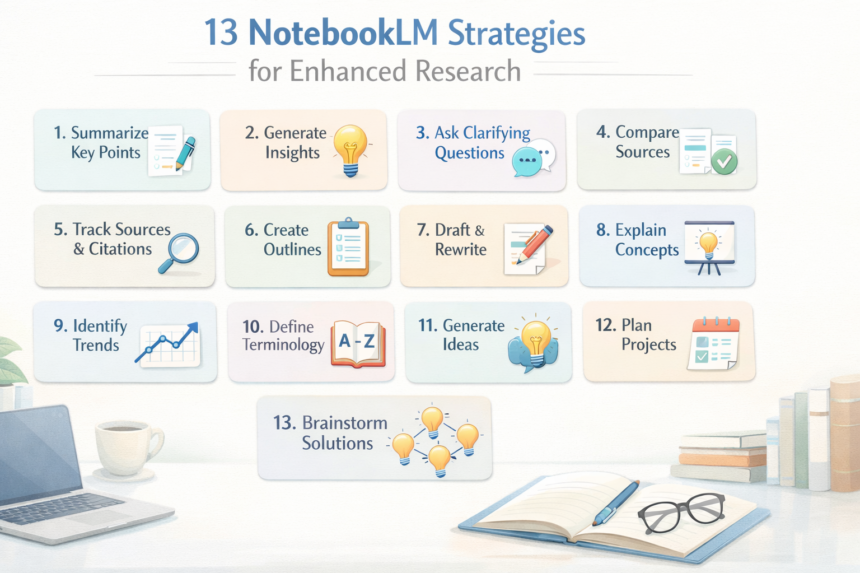
- The “Subject-Silo” Notebook: Instead of a single messy notebook, create dedicated environments for each subject (e.g., Java Backend, System Design, DBMS). This ensures the AI only pulls context from relevant technical sources.
- Multi-Format Source Integration: Don’t just rely on PDFs. You can upload NCERT textbooks, take photos of handwritten lecture notes, or link YouTube transcripts. If a PDF isn’t available, a clear photo of a textbook page works perfectly for the AI to parse.
- The “Active Source” Toggle: Use the source selection feature to limit the AI’s “brain” to specific chapters. If you only want to study Coulomb’s Law, deselect other chapters to prevent “context bleeding” and get more precise answers.
Phase 2: Conversational Learning & Customization
- Defined Conversational Roles: Use the “Custom Instructions” to tell NotebookLM who it should be. Setting it to “Expert Teacher” or “Learning Guide” forces the AI to explain complex logic in simple, step-by-step language rather than a technical manual.
- Citations as Fact-Checkers: Every response comes with numbered citations. Clicking these highlights the exact paragraph in your source. This is crucial for verifying formulas or specific dates for engineering exams.
- Regional Language Output: You can ask questions in English but receive the response in Hindi, Bengali, Marathi, or Gujarati. This is a game-changer for understanding difficult concepts in your native tongue before translating them back for the exam.
Phase 3: Visual & Audio Synthesis
- The “Audio Overview” Podcast: Generate a 5-10 minute audio discussion between two AI hosts about your notes. You can customize the prompt to say, “I am a beginner, explain this using real-world examples,” making it perfect for “passive learning” during commutes.
- Interactive Mind Mapping: Generate a visual Mind Map to see how topics like Electric Fields branch into sub-topics like Gauss Law. Clicking any node in the map triggers a deep-dive explanation of that specific concept.
- Visual Slide Decks & Infographics: Transform dense text into a Slide Deck for presentations or a Landscape Infographic for quick visual reference. These are essential for memorizing “Hard Skills” like system architectures or chemical cycles.
Phase 4: Exam Simulation & Revision
- The “100-Mark” Mock Paper: Use the “Report” feature to generate a full-length question paper. You can specify: “Create a 3-hour, 100-mark paper with Section A (MCQs) and Section C (Long Answers) based on the last three chapters.”
- Hard-Mode Flashcards: Generate a deck of flashcards and set the difficulty to “Hard.” These are best used the night before an exam to drill key concepts and definitions until they are second nature.
- AI-Powered Interactive Quizzes: Generate a quiz with “More” questions and a “Hard” difficulty level. The interface tracks your accuracy and provides a Review Quiz section to explain exactly why your wrong answers were incorrect.
- Dynamic Data Tables: Extract all formulas, units, and physical constants into a Data Table. This can be exported directly to Google Sheets, giving you a “cheat sheet” of every critical variable in your source material.
3 Career FAQs
1. What is the fastest way to break into an AI-augmented role?
Mastering the 13 NotebookLM Strategies allows you to curate niche libraries and become a recognized expert in weeks by sharing high-quality, synthesized infographics on LinkedIn.
2. Is a college degree still required in 2026?
While a B.Tech provides a foundation, the market prioritizes “Demonstrated Synthesis.” A portfolio showing your ability to navigate high-density data via AI often outweighs a degree alone.
3. How do I negotiate a salary for an AI-centric role?
Leverage your productivity metrics. Show how your use of these 13 NotebookLM Strategies allows you to perform the work of a three-person research team, justifying a premium compensation package.