


If you want the Best Laptop Under 70000 for Coding & Design, prioritize models with Intel Core 5/7 H-series, Ryzen 7 7000-series, or Snapdragon X processors paired with 16GB RAM. These machines deliver strong multitasking, reliable battery life, and display quality suitable for development and creative workflows.
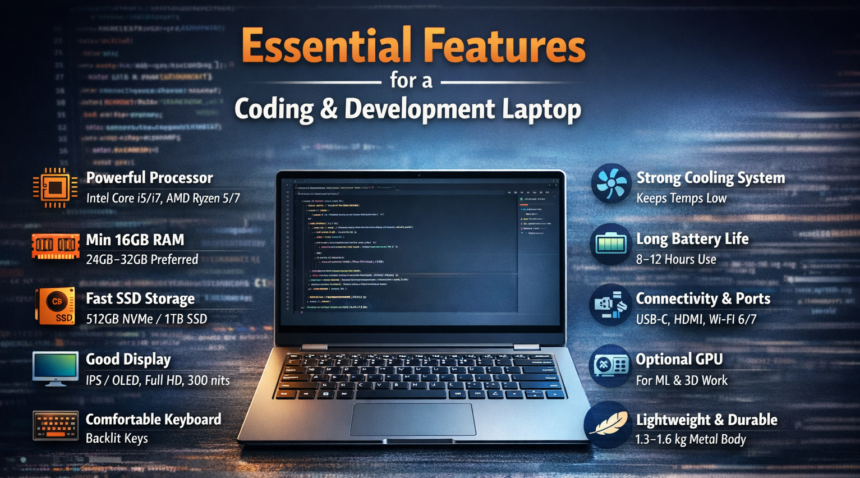
Essential Features for a Coding & Development Laptop
1. Powerful Processor (CPU)
A coding laptop in Best Laptop Under 70000 for Coding & Design should have a modern multi-core processor such as Intel Core i5/i7, Intel Core 5/7, or AMD Ryzen 5/7. A strong CPU helps run IDEs, compile code quickly, and handle heavy development workloads efficiently.
2. Minimum 16GB RAM
During development, multiple tools run simultaneously SO, Best Laptop Under 70000 for Coding & Design including IDEs, browsers, databases, and testing environments. Therefore, 16GB RAM is the minimum requirement, while 24GB–32GB RAM is better for heavy development tasks.
3. Fast SSD Storage
A development laptop must include NVMe SSD storage for faster system performance and quicker project loading.
Minimum: 512GB
Recommended: 1TB
4. Good Display
For long coding sessions, a comfortable display is important. A laptop should have an IPS or OLED display, Full HD resolution, and around 300 nits brightness for clear and comfortable viewing.
5. Strong Cooling System
An efficient cooling system prevents overheating and ensures the laptop maintains stable performance during long development sessions.
6. Long Battery Life
A coding laptop should provide 8–12 hours of battery life, allowing developers to work productively without frequent charging.
7. Connectivity & Ports
Useful ports such as USB-C, USB-A, HDMI, and support for Wi-Fi 6 or Wi-Fi 7 improve connectivity and overall productivity.
Full Technical Specification Breakdown
Below is a consolidated comparison of the most competitive laptops that qualify as contenders for the Best Laptop Under 70000 for Coding & Design.
| Laptop Model | Processor | RAM | Storage | Display | Brightness | Battery | Weight |
|---|---|---|---|---|---|---|---|
| ASUS Vivobook 14 | Intel Core 5 (14th Gen U-Series) | 16GB | 512GB SSD | 14″ IPS | 250–300 nits | ~8 hrs | 1.4 kg |
| Lenovo ThinkPad E14 | Ryzen 5 7530U | 16GB | 512GB SSD | 14″ IPS | 300 nits | ~9 hrs | 1.45 kg |
| Motorola MotoBook 60 | Intel Core 7 240H | 16GB | 512GB SSD | 14″ IPS | 300 nits | ~7–8 hrs | 1.39 kg |
| Dell 14 Series | Intel Core 5 | 16GB DDR5 | 512GB SSD | 14″ IPS | 300 nits | ~8 hrs | 1.5 kg |
| Acer Swift Neo | Intel Ultra 7 155H | 32GB | 1TB SSD | 14″ IPS | 300 nits | ~9 hrs | 1.35 kg |
| ASUS Vivobook S14 | Ryzen AI 5 330 | 16GB | 512GB SSD | OLED | ~400 nits | ~10 hrs | 1.4 kg |
| Samsung Galaxy Book 4 | Snapdragon X | 16GB | 512GB SSD | 15″ LCD | 300 nits | 12+ hrs | 1.55 kg |
Performance, Thermal Throttling, & Gaming
Processor selection determines whether a laptop truly qualifies as the Best Laptop Under 70000 for Coding & Design. CPUs like Intel Core 5 210H or Core 7 240H offer higher clock speeds and more sustained performance compared to energy-efficient U-series chips. These H-series processors maintain stability during prolonged workloads such as compiling code or exporting high-resolution graphics. Deeper technical specifications and official data, refer to the manufacturer’s documentation visit : Official Laptop Specifications Page.
Real-world productivity tests reveal Best Laptop Under 70000 for Coding & Design with 16GB RAM handle heavy multitasking significantly better. Opening dozens of Chrome tabs alongside IDEs like Visual Studio Code or Android Studio becomes manageable without noticeable slowdowns. Systems equipped with DDR5 memory offer slightly faster bandwidth, improving responsiveness in demanding applications. For more technical information visit Savitimes.com.
Pro & Cons
Pros
• Powerful processors suitable for coding, design, and multitasking
• 16GB RAM standard in most models
• IPS and OLED displays with good color accuracy
• Lightweight designs ideal for portability
• Backlit keyboards improve productivity
Cons
• Some models lack fingerprint readers
• OLED displays appear only in limited variants
• H-series processors may reduce battery life
• Snapdragon laptops still have limited app compatibility
Frequently Asked Questions
Is 16GB RAM necessary for coding laptops under ₹70,000?
Yes, 16GB RAM is strongly recommended for development work. Modern IDEs, container environments, and browsers consume significant memory. Best Laptop Under 70000 for Coding & Design with 8GB RAM quickly become restrictive when running multiple applications simultaneously. A 16GB configuration ensures smooth multitasking and longer system lifespan.
Which processor is best for coding laptops in this price range?
Intel Core 5 H-series, Core 7 H-series, or Ryzen 7 processors provide the best balance between power and efficiency. These CPUs offer multiple cores and higher clock speeds, which help during compiling, virtualization, and multitasking.
Are Snapdragon laptops reliable for productivity?
Snapdragon-based laptops deliver exceptional battery life and efficient performance. However, certain legacy Windows applications may still rely on emulation. For standard productivity tools, web development, and cloud workflows, they perform extremely well.